Latest Posts
-
Better Text Layout with text-wrap: balance; and text-wrap: pretty;
Introduction
This article is meant to show you how you can improve your text layout with the new
balanceandprettyvalues for thetext-wrapproperty. Both of these values prevent what can be termed design flaws. You use them because you want the benefit oftext-wrap: wrapand also a better text layout. These property values are part of the CSS Text Module Level 4. We will begin with a review of text-wrap and the techniques used to control line breaks manually. Following that, we will learn about the new property values, which this article is about. We will learn how these values support us in inserting aesthetic line breaks in our text. After each property value is explained in this article, we will take a look at how they work under the hood, meaning how the browser implements them. We will briefly look at what we can do in terms of polyfills for these values and also discuss thestablevalue fortext-wrap. In the end, we will review the full CSS form oftext-wrapand take a look at the browser support charts.What is the
text-wrapproperty?The
text-wrapproperty can be set primarily as eitherwrapornowrapon text to have it be wrapped or not be wrapped respectively.- wrap
The text occupies multiple lines. This is the default
text-wrapvalue. Text may form new lines based on the language. For example, forming lines in English based on spaces. It also follows other hints that we will discuss.- nowrap
All of the text remains on a single line. It overflows its containing element if necessary, rather than breaking onto a new line.
If we choose to
text-wrap: wrap;our text, it will be wrapped.Friends of Known Content
After our text is wrapped, we may further want to control how it is wrapped on top of how
text-wrap: wrap;wraps it. One reason for wanting this could be visual typography. For example, when our text is wrapped, it can be wrapped oddly. There may be one word left on the last line in a big block of text. Or one sole word on the second line in a two-line hero section heading or the headline of a blog post. In the case of a hero section heading, what we may want is the balancing of the headline among multiple lines each having the same or almost same amount of words. So, how do we control how our text is wrapped on top of howtext-wrap: wrap;wraps it?For a big block of text with one word on the last line, we can use
es instead of normal spaces between the last two or three words, so that they would go to the last line.In the case of a hero section heading of two lines with only one word on the second line, we can use the
<br>tag to equally divide the text between the two lines. Doing so wouldn’t be responsive though. This means that you could get a worse typographic layout, because of the break tag, on different screen sizes. Same with using the es in the above example, that solution is not responsive either.We have a few more friends. You can use the line break opportunity element
<wbr>to let the browser know that it can also additionally break the line in the middle of a word if it wants. You can use the soft hyphen character­and thehyphensproperty to hyphenate at a specific point to break a line and even let the browser handle the hyphenation too.There is one limitation though with all of the options that we have discussed so far. You can only get help from these friends if you are aware of the content itself such as in the case of a static HTML file. What if the content is not in your hands? Meaning that the content is dynamically added to the HTML file. For that up until a little before you had to use JavaScript to make such typographic layout improvements. Now there is a solution native in CSS that would be our friend for text from unknown content.
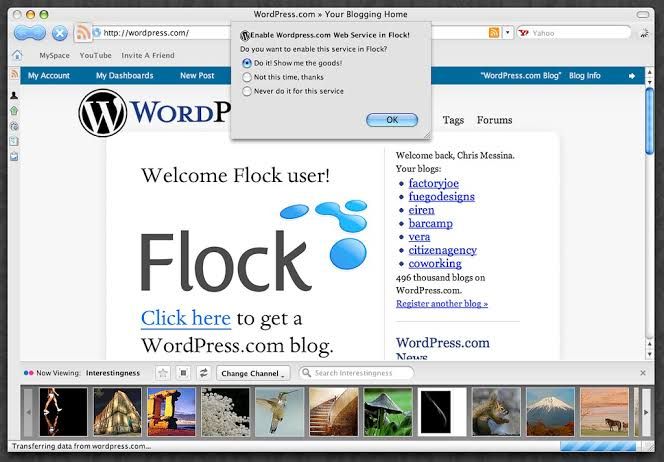
*A blog made with the WordPress CMS is an example of a website with content dynamically inserted into HTML files Source: Flickr* Friends of Unknown Content
Aside from the fact that our text may come from unknown content, there is another thing to consider. The websites that we make can be viewed on different screen sizes. The viewer may use the zooming option to change the font size. They may have a browser extension to switch the website between day and night mode. They may also right-click, select translate, and change the language of the website that we have made. Even though these aspects of browsing make the elements needed for the aesthetic treatment of the text of our websites variable, the browser also continues to give more options to the developer to put more nuance into the websites that we make. This time the browser has given us two new values for the
text-wrapproperty. Let’s befriend two new friends so that they help us with our text from unknown content. Meetbalanceandpretty. Together, we came up with three limitations of our friends of known content:- We have to know the actual text for them to work.
- They are not responsive.
- They do not hold up fully when the user uses the font and text customization features of the browser.
balanceandprettywill help us with all three of these limitations.The New Values
text-wrap: balance;— wraps text so that all lines are the same or almost the same amount of characters. It is like justified alignment in a way. This will help us get rid of the break tag from our hero section heading. Try commenting out the CSS ruletext-wrap: balancein the demo below to see the difference.Demo widget: https://codepen.io/shammadahmed/pen/azoQmEa
text-wrap: pretty;— avoids orphans, meaning that it makes sure that there are no one words on the last lines. This value will have more features, other than avoiding orphans, in the future. This will help us get rid of the es that we inserted among the last few words in our big block of text with only one word on the last line. Try commenting out the CSS ruletext-wrap: prettyin the demo below to see the difference.Demo widget: https://codepen.io/shammadahmed/pen/qEWQjdq
Using
balanceprevents orphans too, but goes further in making the multiple lines of text generally the same width. For the hero section heading problem that we discussed, usingbalanceis perfect. Usingprettyis more focused just on orphan prevention alone, making it more appropriate for text for which you neither want equal-width lines nor orphans. The pretty value is expected to become even better in the future with new features such as being able to avoid rivers. Rivers are white space lines that you can trace very easily among words with your eyes in a block of text.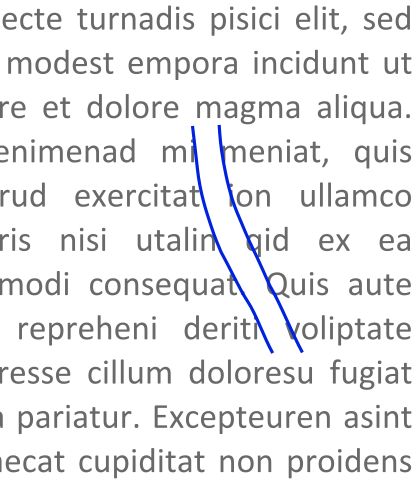
*An example of a typographic river Source (modified): Wikimedia Commons* Typography
Making headlines visually appealing and easy to read is a goal of designers. They do so to create a visual hierarchy on the page and catch the reader’s attention. Balancing text in typography goes back to the early days of printing when printers would hand-place letters. These days, designers have much more tools in their arsenals to balance text in their designs. You may have heard of kerning and read about metric versus optical alignment. Building on the traditions of designers from the print industry,
text-wrap: balance;andtext-wrap: pretty;bring the art of balancing text to the web in an automated way, though there is more to come. Especially with theprettyvalue. Check out this New York Times article on headline balancing.Balancing the main article text is not common as it doesn’t need to stand out or catch the reader’s eye. You may use
text-wrap: balance;on headings and subheadings to make them have equal or almost-equal width lines. You may usetext-wrap: pretty;on paragraphs of text to get rid of orphans on the last line. The purpose of this tutorial is to show you how simple these property values are and how very simply you can add them both to your CSS to certain tags for better text layout. Let’s learn about these values in more detail.Despite mostly Chromium-only support (browsers based on the Chromium browser engine), the use of these values would be a good candidate for progressive enhancement. It won’t negatively affect the experience if someone is not in a supported browser, but it will enhance the typography of the page for those in a supported browser.
text-wrap: balanceWith
text-wrap: balance;, text is wrapped in a way that best balances the number of characters on each line. Because counting characters and balancing them across multiple lines is computationally expensive, this value is only supported for blocks of text spanning a limited number of lines. This limit is six or fewer lines for Chromium, the browser engine behind Chrome and Edge and it is ten or less for Firefox. As browsers limit the number of lines impacted by this property, this value’s impact on performance is negligible. However, it should only be used on headlines, headings, subheadings, or small paragraphs. Applying it to large paragraphs will have no effect and comes at a performance cost because the browser is trying to calculate optimal balance even though it won’t apply anything.// Not recommended * { text-wrap: balance; }There are three powerful features of this value:
-
You don’t need to wait and time text wrap balancing with font loading, like you may need to do with a JavaScript solution. The browser takes care of it.
-
It will style languages with alternate writing directions such as right-to-left (Arabic, Persian, Urdu, etc) and vertical (Japanese) without any additional effort. Check out the demo below which uses Urdu, most commonly a right-to-left script language (it is also written using other scripts like Devanagari), for our hero section. Try commenting out the relevant CSS rule to see the text not be balanced.
Demo widget: https://codepen.io/shammadahmed/pen/wBwQVWw
- It is responsive meaning that our text can readjust its balancing when the screen size changes, to become balanced again. Use your browser developer tools to view the demo above in a different screen size to see how
balanceadapts for Urdu.
Applying this style may not provide you with the results you expect. It could be because the text needs to wrap and therefore have a maximum line length applied from somewhere. You may use
max-inline-size. It is likemax-widthbut can be set once for a particularwriting-mode.Balancing won’t change the inline-size of the element
There’s an advantage to some of the JavaScript solutions for balanced text wrapping (which we will discuss in the polyfills section), as they change the max-width of the containing element itself. This has the bonus of the container being “shrink wrapped” to the balanced text block. On the other hand
text-wrap: balance;can create a visual imbalance for the container, since the width of the container remains the same and the width of the text is reduced by being balanced. You can easily fix this by usingwidth: fit-content..shrink-balanced { text-wrap: balance; width: fit-content; }balanceand thewhite-spacepropertyBalancing text clashes with the
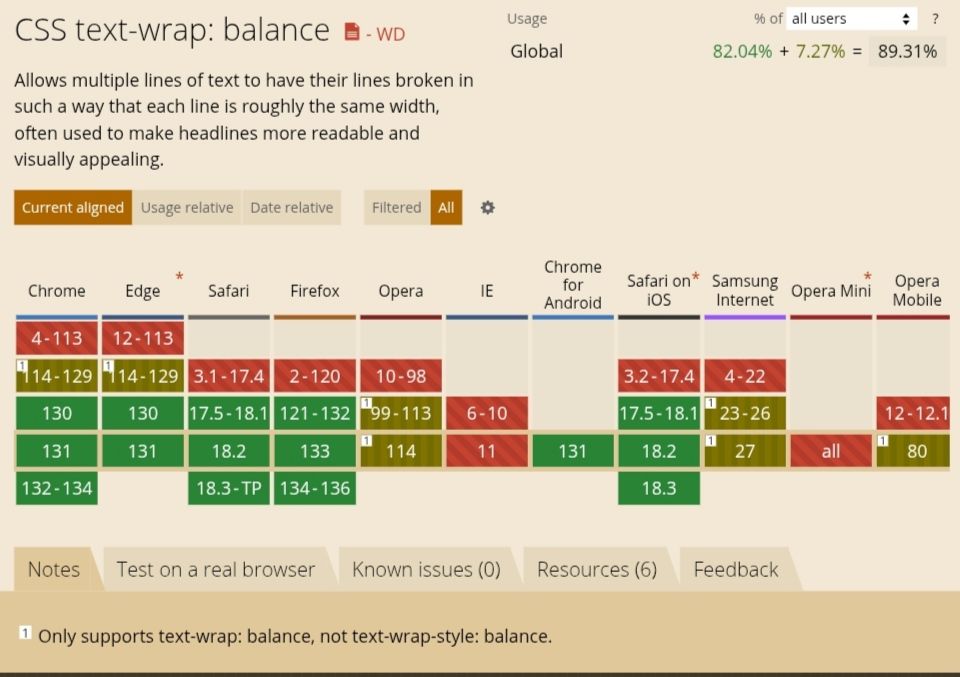
white-spaceproperty because one is asking for no wrapping and the other is asking for a kind of wrapping. You can overcome this by unsetting thewhite-spaceproperty. The text will remain balanced then..balanced-text { white-space: unset; text-wrap: balance; }balanceBrowser Supportbalanceis supported in all majorly used browsers.How does balance work under the hood (Based on Chrome sources)
There are two basic approaches when breaking text into lines.
- Line-by-line algorithms, also known as “greedy” algorithms. This algorithm is fast and is the default for all current browsers.
- Paragraph-level algorithms.
Both
prettyandbalanceare paragraph-level line breaking, but they are designed for different purposes and produce different results. How balance works is that the browser effectively performs a binary search. It looks for the smallest width which doesn’t cause any additional lines, stopping at one CSS pixel (not equal to one display pixel). To further minimize steps in the binary search the browser starts with 80% of the average line width.text-wrap: prettyprettyis the opposite of balance in that it can be used on entire blocks of text. To balance between the typographic benefits and the performance impacts, it adjusts only the last four lines of a paragraph. The lines above the last four lines remain unchanged.Using
prettyoften impacts performance, so it should be used for longer blocks of text when the layout is more important than speed.Right now with the current implementation,
prettydoes a little more than simply avoiding orphans. According to the Chrome for Developers blog,prettyadjusts hyphenation if there are consecutive hyphenated lines at the end of a paragraph or adjusts previous lines to make room. It will also appropriately adjust for text justification.prettyimproves the overall line wrapping and text breaking in general. It is currently focused on avoiding orphans. In the future,text-wrap: prettywill provide more features like being able to avoid rivers, as we discussed earlier.prettyis also responsive likebalanceand will also style languages with alternate writing directions such as right-to-left (Arabic, Persian, Urdu, etc) and vertical (Japanese) without any additional effort, likebalance. Check out our block of text example demo in the Urdu language below. Comment out the relevant CSS rule to see the difference. Also, use your browser developer tools to view the demo in a different screen size to see howprettyadapts for Urdu.Demo widget: https://codepen.io/shammadahmed/pen/jENQgwr
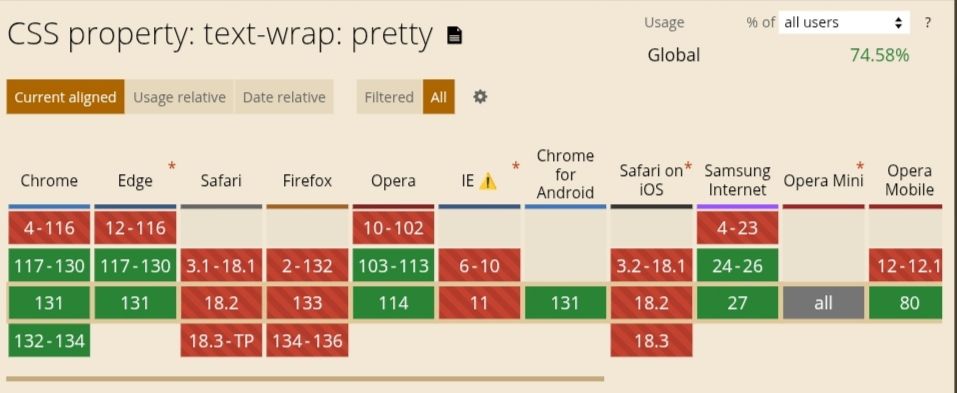
prettyBrowser Supportprettyis only supported in Chrome and Edge.Design Considerations
Widows are words alone at the top of a text block and orphans are words alone at the end of a text block.
prettyonly handles orphans, and not widows.Note:
text-wrap: prettyis different from CSS’sorphansproperty which is relevant when using CSS multi-column layout.How does pretty work under the hood (Based on Chrome sources)
prettyuses “Score-based Paragraph-level Line Breaking”. Paragraph-level algorithms take other lines in the paragraph into consideration to achieve better typography. This type generally produces better typography, with the cost of performance. TeX is one of the most famous applications of this type of algorithm. Because paragraph-level algorithms are slow, there are multiple variants to mitigate the performance impacts.Check out this GitHub issue.
The Algorithm
The current implementation of this algorithm used in Chromium is based on the Knuth-Plass algorithm used in TeX, and on the Android’s ‘optimal’ line breaker, which is applied when BREAK_STRATEGY_HIGH_QUALITY (the default value for TextView) is specified.
*TextView is a basic UI element in Android that displays text and handles user interaction Wikimedia Commons* In short, it works as follows:
- Compute all break candidates (that are break opportunities, the points where lines could break.)
- Determine the penalty of each break candidate.
- Compute the score for all possible combinations of break candidates.
- The final breakpoints are determined by the candidates with the best score.
Performance Considerations
While the
text-wrap: prettyproperty is an opt-in to accept slower line breaking, it shouldn’t be too slow, or web developers can’t use them due to their performance restrictions. There are five performance considerations out of which one is not currently applied. Read the performance consideration heading in this document here: Score-based Paragraph-level Line BreakingPolyfills
The JavaScript solution that has existed for a long time is Adobe’s BalanceText. Another is a React component called React Wrap Balancer. Both are polyfills only for
balanceand not forpretty. Check out GitHub for more solutions or write one on your own.Honorable Mention:
stableThe stable value improves user experience when text is
contenteditable. This value provideswrapand makes sure that, as the user is editing text, only the next lines rewrap, meaning that the whole block of text does not rewrap which can confuse the user. The latter behavior, of the whole block rewrapping, would be the case withauto(text-wrap-mode: wrap; text-wrap-style: auto;). The behavior for all the three values that we have discussed in this article are otherwise equivalent to the valueauto. Check out the demo on this MDN page, select the stable value from the list, and play around a bit with thestablevalue.The Full CSS Form of
text-wrapThere are 2 ways that text can flow across lines within a block of content. One is soft line breaks that the browser controls. The other is forced line breaks, that the user controls. The
text-wrapproperty can be used to control soft line breaks.text-wrapis the shorthand for two properties:text-wrap-mode text-wrap-stylePossible values that
text-wrap-modeandtext-wrap-stylecan have:/* Keyword values */ text-wrap-mode: wrap; text-wrap-mode: nowrap; /* Global values */ text-wrap-mode: inherit; text-wrap-mode: initial; text-wrap-mode: revert; text-wrap-mode: revert-layer; text-wrap-mode: unset; /******** If "text-wrap-mode: wrap;" is selected, then "text-wrap-style" can be specified as a single value from the list below. ***********/ /* Keyword values */ text-wrap-style: auto; text-wrap-style: balance; text-wrap-style: pretty; text-wrap-style: stable; /* Global values */ text-wrap-style: inherit; text-wrap-style: initial; text-wrap-style: revert; text-wrap-style: revert-layer; text-wrap-style: unset;Note: The
white-space-collapseandtext-wrapproperties can be declared together using thewhite-spaceshorthand property.Browser Support
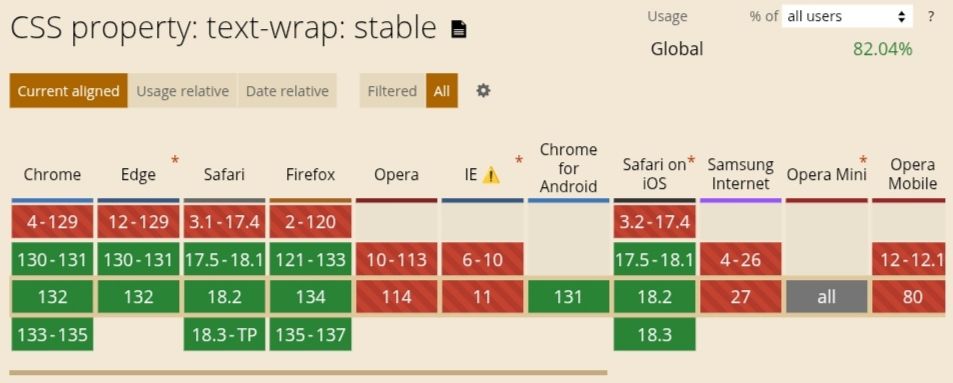
Let’s look at the browser support charts from caniuse.com.
balanceis supported in all browsers.
prettyis only supported in Chrome and Edge.
stable
Conclusion
The underlying implementations of
balanceandprettythat we discussed in this article are paraphrased from Chrome sources.We have explored the two new value additions to the
text-wrapCSS property in depth and briefly reviewedtext-wrapin general too. I hope that you enjoyed reading this article and are now confident in your knowledge to use the new value additions in your web development. Till then, happy coding! -
An elevator pitch for this blog
Hey there interested reader
I was just reading this book on how to take short steps to drastically improve a blog and the first tip was to come up with an elevator pitch both short and long. The short to make people get hooked and the long one to further educate them on the blog and maybe even, potentially, to convert them into avid readers of the blog.
Defining the audience
The things that I will be initially covering on this blog are programming stuff, philosophy and personal goals and projects that I will be working on. Having said that, things will change too and, who knows, even see the light of the day. What?
So, I guess, the readers would be peolple interested in programming, philosophy, and related things. And these mostly would be professional people, that I can predict.
Naming the website
The title currently just says ‘hammad.blog’, same as the internet address. Let’s name this blog “The Lomekwian” after the 3.3 million years old tools discovered in Keyna. As I have discussed before on the blog, these are the oldest man-made thing known. One of the tools discovered is an anvil, so I guess a weird anvil would be an interesting logo for the site.
Does this blog solve any real problems?
I guess not really any problem that is critical at the moment. But I’ll be covering complete JavaScript and Haskell tutorials, they might come in handy.
There you go: the short one
“The Lomekwian is my personal blog. Reading it will make you wicked smart.”
Here it is: the long one
*The Lomekwian is a blog that exists, at large, as the thought product of its sole author, Hammad, a place where he shares his passions, projects, adventures and goals, and finally while leaning as a symbol of human presence”
Using the elavator pitch
I will try putting this on as a tagline below the website title and include it in the about page.
Till then
See you in the next episode.
-
A Blog Pitch
Table of Contents
- Table of Contents
- Genesis
- The creation of a blog;
- Studing history through internet history
- Keyboard Only
- Renaissance Man
- OCD
- Predicting behavior
- Aesthetics
- That’s all folks
Genesis
I have cut out many headings but it still is a lot. These are some of the few things that I intend to post here, on this blog. This post acts as a little collection of things to make me remember and easily achieve the 30 posts goal of this month. Sorry for this post being heavily unedited.
The creation of a blog;
In 2011, Sonia Harmond, a French archaeologist discovered the Lomekwi 3 stone tools in Kenya near the town of Lomekwi. These tools have been discovered dating to 3.3 million years, making them the oldest tools ever found. Lomekwi 3 is the name of the archaeological site where the tools have been found. Among the tools, are anvils. Anvils are metalworking tools. But the meaning of an avil below is beyond its use. It symbolises utility and technology and primitive tools.
The oldest known cave paintings are as old as 44,000 years old. These are of animals like deers and bisons
The Epic of Gilgamesh and the Pyramid texts are one of the oldest works of literature. These works tell stories that have become part of new cultures and have constantly been transfered throughout history and still remain alive. These stories try to make sense of what is means to be alive, have consciousness, to communicate with symbols, and run out of chaos.
The Knap of Howar, a farmstead on an island of Scotland, is one of the oldest buildings in the world.
These old thinggs are still with us and we might be made up of the same particles that the people who made the Lomekwi tools were made of. And that is absolutey crazy.
Drawing a parallel, I’m like those people and thig blog as a whole and this post in particular is like an anvil or painting. And this thought fills my heart with deep peace.
Art direction
I was watching the Graham Norton Show the other day, and found the art direction to be better than most comedy talk talks. Everthing, the intro animation, music, the stage design, the host’s manner of talking, the jokes, the atmosphere and the mood established was unchanging and coherent throughout the show. I will experiment art direction on this blog to see how it goes.
Blogging as a medium
This blog will also explore as an art form. How blogging acts as a representation structure of the mind, the changing self, and the forever flow of symbols and everything. How the medium itself can be enhanced
Blogging goal: December 2019
The near-future goal is to publish at least 30 posts before 2020. And hopefully keep a strong pace and keep publishing throughout my life. Maybe hundreds of thousands of posts, who knows?
Studing history through internet history
Finding patterns in that time period because it is definitely the most documented epoch of time and the one we are currently living through.
Keyboard Only
I know many keyboard shortcuts and hardly even use the mouse/touchpad. But this time I’m going full keyboard meaning that I will gradually and gracefully reduce the usage of any graphical user interface like the file manager or the browser. I will keep updating here on this blog on any steps that I take to go Keyboard Only. Let’s call this Project K.
Renaissance Man
Before I turn 30, I plan to become a professional/academic/full-time renaissance man. This will include completing Khan Academy, reading Britannica, reading the dictionary, doing the material from edX/Coursera/MIT OCW, making projects and experimenting and doing everything. Let’s call it Project R.
OCD
OCD is kind of like a disability. I have dealt with mental rituals and visual symmetry anxiety since I was very young. All of these have subsided by now but caused a great lot of anxiety in older days. I will try to share my personal experiences and try to make sense of everything. Let’s call it Project O.
Predicting behavior
After I had finished watching Revolutionary Road, a drama directed by Sam Mendes based on the 1961 eponymous novel by Richard Yates, during some time thinking about the film, mainly based on the plot, I realized that human behavior can be completely mechanically predicted. Whether or not this is true, it sparked a deep fascination with being able to predict human behavior, in everything including meeting people to those of different kinds of professions to those of different eras and cultures. What makes one person laugh or other doesn’t? What is the nature of emotions, moods and atmospheres in a person? Maybe there can be mathematical forms for these kinds of things or not. I’m calling all activity in the domain Project B.
Aesthetics
What is the meaning of art? How art interacts with a person? Who makes art? Why do people make art? What defines a film or a painting or any art form? How do you differentiate art from anything else? What is the difference between a film on TV versus on a mobile phone? All these kinds of questions and other, I’m including in Project A.
That’s all folks
That’s is mostly what I’ll be sharing through this blog. I would love to see your comment and would try to reply to every single one.
-
Variables in JavaScript
Table of Contents
- Table of Contents
- Introduction
- What is a variable?
- Declaring a variable
- Declaring multiple variables at once
- Changing the value
- Rules for declaring variables
- Constants
Introduction
In this tutorial, we are going to discuss JavaScript variables, what they are, how they are used and other tangential topics along the way.
What is a variable?
A JavaScript variable is a storage for data with a name. The data in a variable may be changed any number of time after set. You may think of a variable as a box with a label on it. Inside this box, you may put anything you want. And you may use this box for any purpose you can imagine. The idea of a variable is more visceral than it is definitive. You will probably completely grasp the its essence after using it a few times.
Declaring a variable
A variable can be declared, that is created , with the
letkeyword followed by the name of the variable, followed by an equal sign, follwed by the value, and that’s it:let puppets = 99;The above statement declares a variable named puppets and assigns it the number 99. That is not the only way to do it. You may first only declare the variable name. And then after that you may or may not assign a value to it. Like this:
let bugs;

bugs = 98;
After a variable has been declared, it may be accessed if needed. Like you can alert the contens of a variable just by putting the name of the variable in between the brackets:
alert(bugs)
alert(puppets)
Declaring multiple variables at once
You can also declare an infinite number of variables with a single let keyword. Let’s have a look at this example:
let ants = 97, peacocks = 96, sparrows = 95, butterflies = 94;While you can do this and get away with this so easily, yet may not grow up to adore this as much as you are doing now sitting there reading this. For the sake of readability, always consider declaring variables line by line.
let ants = 93;
let peacocks = 92;
let sparrows = 91;
let butterfiles = 90;
Although, I got those numbers wrong, you may now have an appreciation for the readability this multi-line variant brings. Embrace it. Move on.
Weird ways you can declare variables include doing these:
let ants = 89,
    peacocks = 88,
    sparrows = 87,
    butterflies = 86;

let what = 85
  , does = 84
  , it = 83
  , even = 82
  , mean = 81;
Changing the value
You may change the value of a variable any time you like:
let bottles = 80;
bottles = 70; // value changed
alert(bottles); // outputs 70
Rules for declaring variables
Following are the rules for the legal ways to declare variables in JavaScript:
-
Variable names must contain only letters, digits, underscores (_), and/or dollar signs ($).
-
The variable
butterflyis different fromButterfly. So, variable names are case sensitive. -
Variable names cannot start with a digit. So
5fortuneis an illegal name. -
You cannot use reserved keywords as variable names. These inlcude words used by the language as syntax like:
let,class,if,function,return, etc.
Constants
You can also declare objects which cannot change value. These are called constants. They are declared with the
constkeyword.const paintings = 79;Once the above statement is executed, the following statement would result in an error:
paintings = 78; -
Numbers in JavaScript
Table of Contents
- Table of Contents
- Introduction
- Numeric Types in JavaScript
- JavaScript Numbers
- Scientific Notation
- Numbers & Strings
- Precision
- NaN (Not a Number)
- Infinity & -Infinity
- Hexadecimal
Introduction
Numbers are the building blocks of programming logic. Themselves being so simple, natural, and metaphysical, they prevade almost all programming tasks. In this tutorial, we’ll discuss how numbers are used in the JavaScript programming language.
Numeric Types in JavaScript
JavaScript has two numeric types: Number and BigInt.
JavaScript Numbers
Unlike many other programming languages, JavaScript has only one type of number that is, number, itself. Since JavaScript has dynamic types, any variable can be used to hold a certain data type such as number:
const food_items = 13;Scientific Notation
You can also use scientific notation to store numbers conviniently which would otherwise be difficult to maintain in plain notation. Here’s how you do it:
const microorganisms_in_jelly = 7.89e13;    // 78900000000000
const tiny_share = 9.7e-6;                  // 0.0000097
Numbers & Strings
What happens if you add a number and a string? String Concatenation.
1 + "2" // 12
1 + 2 + "3" // 33, since the JavaScript interpreter works left to right
Precision
In JavaScript, integers are only precise up to 15 digits.
99999999999999999999999999999999 // 1e+32
98989898989898998989899898989898989898989898989898989 // 9.8989898989899e+52
NaN (Not a Number)
NaN is a special value of Number, despite not being a number. This property indicates that the value is not legally a mathematical number. These cases show when it’s returned:
99 / "two" === NaN          // true
Math.sqrt(-1) === NaN;      // true
parseInt('number') === NaN; // true
parseInt('NaN') === NaN;    // true
parseInt(NaN) === NaN;      // true
Note:
NaA === NaN         // false
Number.NaN === NaN; // false
// And
99 / "2" === NaN    // false
NaN is rarely used in writing a program.
Infinity & -Infinity
In JavaScript,
Infinityand-Infinityare special values of Number. Positive infinity is greater than any other number including, Infinity, itself. The JavaScript infinity behaves similar to the mathematical infinity:Infinity * 3 = Infinity; // any positive number times Infinity is Infinity Infinity * -3 = -Infinity; 3 / Infinity = 0; // any number divided by Infinity is 0 1 / 0 = Infinity;Note:
Number.POSITIVE_INFINITY ===  Infinity;    // true
Number.NEGATIVE_INFINITY ===  -Infinity;   // true
Hexadecimal
Numbers are, by default, decimal in JavaScript. To have a hexadecimal number, just precede it with
0x:0x66 === 102; // true 0x4 === 4; // true oxFA === 250; // true -
How to Write a Technical Tutorial
Table of Contents
- Table of Contents
- Introduction
- Define the topic
- Define the scope and depth
- Define the reader
- Break it down
- Define the individual units of the tutorial
- Resources
- Content
- Group the units to form macro units
- Group macro units into form large parts
- Define a purpose
- Form a holistic narrative
- Edit the first draft
- Proofread
- Define a title
Introduction
This guide serves to lay out the process of writing the perfect tutorial and the art and science behind it.
Define the topic
Purposefully select a topic for a tutorial.
Define the scope and depth
Define the scope of the tutorial as to how much of the topic and what aspects of the topic the tutorial will cover.
Define the reader
- Someone who has never developed before
- Junior developer
- Mid developer
- Senior developer
- Old master
Break it down
Break the topic down into a table of contents
Define the individual units of the tutorial
Are there going to be examples, code samples, images, animated images, videos, quotes, etc
Resources
Gather the resources for reference.
Content
Fill those units with content
Group the units to form macro units
Group relevant units into macro units so they form a micro narrative that consistently flows as it is read.
Group macro units into form large parts
Group relevant macro units into large parts of the tutorial
Define a purpose
Define a singular and visceral purpose (may be composite of other purposes) of the tutorial
Form a holistic narrative
Form a holistic narrative and arrange all of the content in pertinence to the visceral purpose.
Edit the first draft
Edit the first draft with the purpose in mind.
Proofread
Proofread the tutorial in a site like Grammarly.
Define a title
Define a title that will both represent the tutorial itself and help the user find most easily.
-
The First Edge
What makes you work today at peak performance may not work itself tomorrow. Do you need willpower or motivation? A todo list, a plan, a system, grit, perseverance, a the perfect routine(s)? Do you need all of them? When exactly will you get started on your plan? When will you start to remain true to it consistently? When, finally, will you evolve out of this anarchy into the special person you thought you always were? When will this picture of reality and that of the dream overlap to fully fit and not form some form of distorted misery? Maybe you are near. How will you get your special and ideal future self to share a shadow with you?
This is my first post here and eventually one of the thousands. I plan to document my life, thoughts, and endeavors that I plan to pursue this year, in the posts to come. I actually have a lot of disconnected wires in my brain that are begging to get connected and be able to let a good amount of charge flow to the destination. It’s important to get those wires assembled because there is no destination without a journey. And the ugly part is that I focus too much on the destination without paying any heed to the journey itself. Those charges are a bunch of essential things that I must do on a rigorous schedule. But, unfortunately, I’ve only been paying a little amount of time on the most important things and when I do, it’s just a few minutes sooner or later in the day, in which I just get bogged down in the intricacies of the most unimportant parts of the most important things.
To change the course of my life from going the unintended way, I’ve decided to refrain from the support of willpower, motivation and other such things as getting engrossed in making deep plans, systems or anything of that nature which holds me back from starting. And that start doesn’t have to be good. It’s to be a mere start. A small edge to get by. It’s to hold to small edges and finding other edges to strengthen your grasp. Sooner, you would be completely grasping it. And, one day you would be on top of it. Your real shadow would abide by the boundaries, size, and shape of that idealistic and futurist shadow of that special someone — the near future you.
What you first need to do is to find an edge, not to do anything special, but to get a hold just enough to save you from falling. And, every day, you keep holding it and move ahead while being on the lookout for new edges, or maybe old edges you know but never had a swing from. For me, it is this blog post that’s the first edge.
You must act now. You first edge maybe a post like this. It may be a small video, it may be a paragraph or a walk — you already know it, don’t you? Go take the plunge.
Your failure to act may make you the person you never intended to be. Take control of your mind. Separate yourself from your body. Let your identity hold your consciousness accountable.
Act.

subscribe via RSS